

With Getsroom, accepting direct bookings from guests has never been easier. Our booking engine is designed to be user-friendly, quick to set up, and flexible for your property needs.
Here’s a step-by-step guide to setup your booking engine:
- Sign Up or Login as a Partner
Access the Getsroom dashboard with your Property Partner account. If you don’t have an account yet, sign up first. - Add Your Property & Room Details
Provide all relevant information, including:- Property name
- Short description & amenities
- Room pricing & capacity
- Property / room photos
- Set availability and pricing
You can easily configure the number of rooms and prices using the price calendar, but make sure you have created a room beforehand. - Using the booking engine widget
Once the property, room, and price are set up, go to the Property menu and select the Booking Widget. You can copy and paste the widget into any website in HTML format.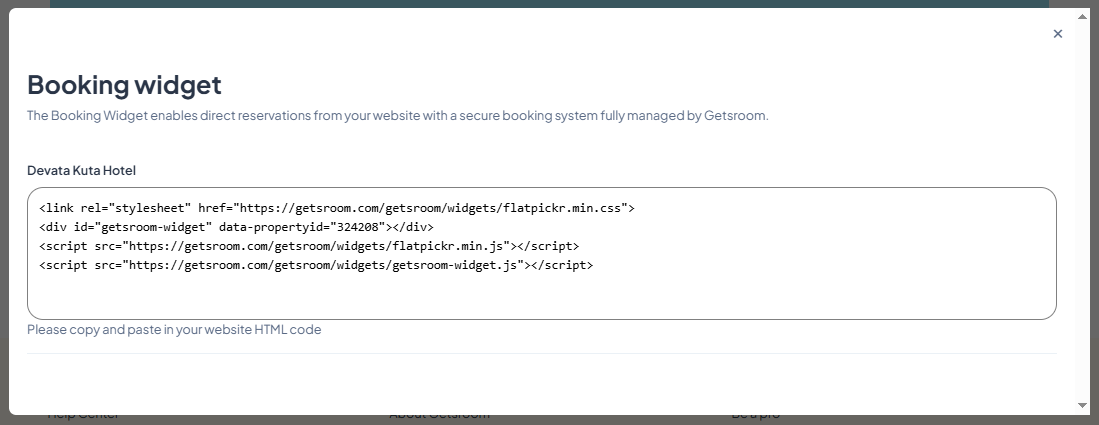
- Using Booking Link
In addition to the booking widget, Getsroom also offers a Booking link that takes guests directly to your property or to each individual room you create. This simple yet effective feature makes it easy for guests to make reservations. You can place the link on your property page or customize it to lead directly to your room’s detail page.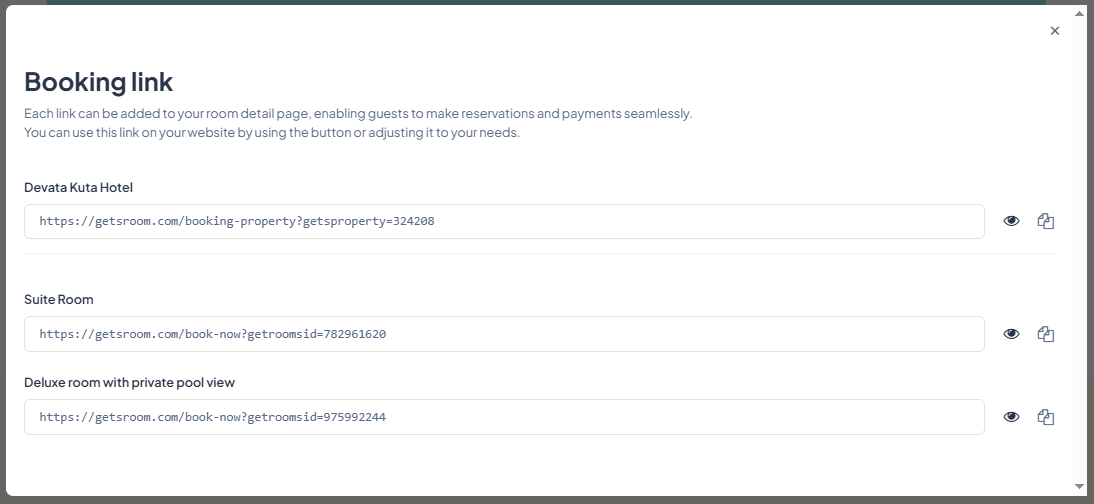
Additional Tips
- Keep calendars and pricing updated
- Use clear photos and descriptions
- Always display cancellation policies transparently
With these steps, your property is ready to welcome guests without intermediaries and maintain full control over revenue.